App Store
Available free on the App Store.

✓ Version 1.6.3 live for iPhone, iPad and Android
AboPilot shows you what gets charged next, how long you can still cancel and which free trial is about to cost money. No account, no cloud and no access to your bank.
No sign-up, no subscription, no trial that starts charging later.
The problem
Streaming here, insurance there, a trial month you only meant to test once. Individually they are small amounts. Together they add up to a number almost nobody knows – and deadlines that pass quietly.
AboPilot answers the two questions that actually matter: what does this cost me, and when do I need to act?
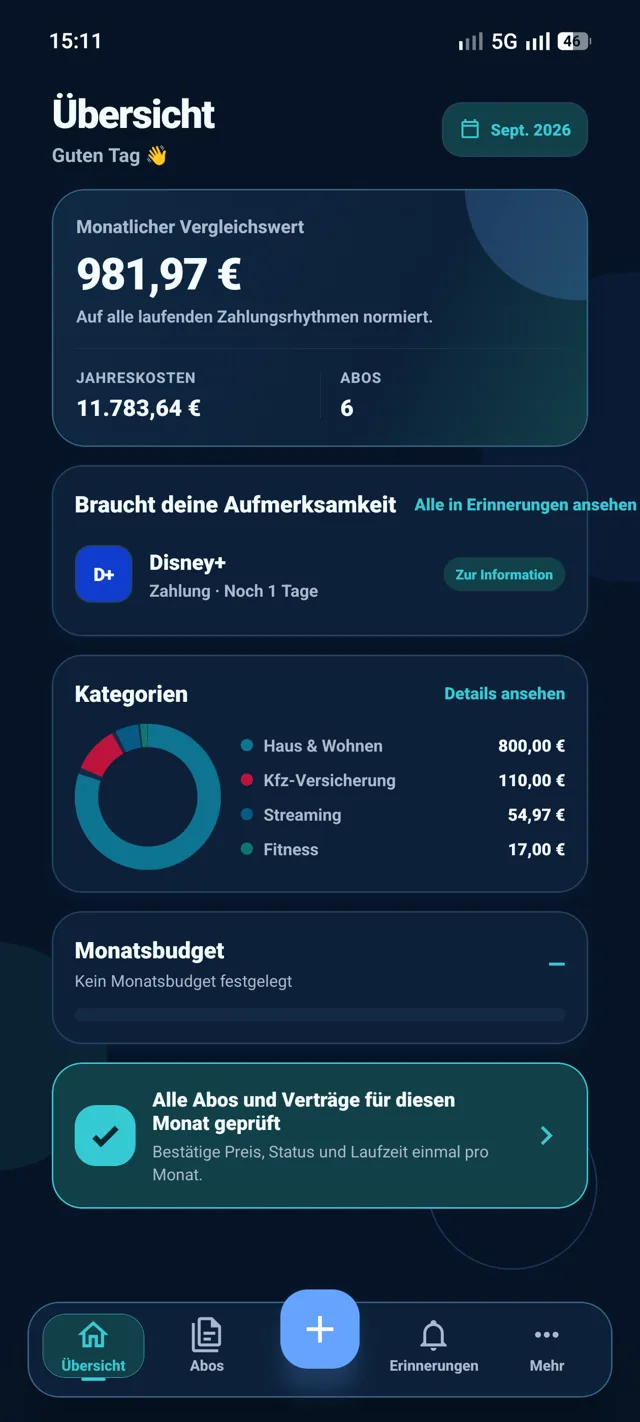
Example view from AboPilot. Your numbers only ever exist on your device.
Free tool
The new subscription cost calculator makes monthly, yearly and other recurring payments directly comparable. No sign-up and no data transfer.
Straight from the app
Four areas, one purpose: seeing what is coming before it is charged.
Features
Upcoming payments, tight deadlines and expiring trials sit together on one screen. When there is nothing to do, the area stays quiet – AboPilot does not invent urgency.
The calendar puts payments, contract endings and cancellation deadlines on the right day. The cancellation radar tells you which date counts and whether you need to act now or can still wait.

Insights convert every payment rhythm into a comparable monthly value and show where your money actually goes.

You stay in control
The app reminds you, puts things in order and records what you decided. It never sends anything on your behalf, which is why it needs no access to your accounts.
Date, remaining time and contract status at a glance.
Keep, review later, pause or cancel.
Document the cancellation date and confirmation for yourself.
Context
There are three common ways to keep subscriptions under control. They mainly differ in what you have to hand over.
| AboPilot | Apps with bank sync | Your own spreadsheet | |
|---|---|---|---|
| Access to your bank account | Not needed | Usually required | Not needed |
| User account | None | Almost always required | None |
| Where your data lives | On your device | On the provider's servers | In the file |
| Cancellation deadlines | Radar with reminders | Depends on the provider | You track them yourself |
| Contracts without direct debit | You add them yourself | Often not detected | You add them yourself |
| Price | €0 | Often subscription-based | €0 |
A comparison of the three common approaches. Individual products may differ.
Honestly
So you know what you are getting before you install it.
Without access to your account the app cannot see what is being charged. You enter your contracts once yourself.
That would require a server, and there deliberately is none. Moving over works through a backup.
AboPilot never sends anything in your name. It reminds you in time and records what you decided.
The app shows deadlines and dates. It does not replace legal advice.
Privacy by design
AboPilot is local-first. Contract data, decisions and attached documents stay in the app storage on your device. There is no server they could sit on.
Read the privacy policy →Price
AboPilot is completely free. There is no pro version, no locked features and no trial period that starts costing money later.
€0
Behind the app
PinguBit is a small independent web and app studio based in Germany. AboPilot is one of its own products and started from a simple requirement: keep track of contracts without handing over an account, a cloud or access to a bank account.
There are no investors in the background and no business model built on user data. Questions, bug reports and requests go straight to the people who build the app.
Yes. There is no pro version, no in-app purchases and no advertising. The app is free on the App Store and on Google Play.
Yes. AboPilot needs no account and does not transfer your contract data or documents to any server of ours. There is no automatic synchronisation.
No. You enter your contracts yourself. That is exactly why AboPilot also covers contracts that are not paid by direct debit.
No. The app reminds you and helps you judge the situation. Cancelling, pausing or documenting always stays your own action.
You export a backup in the settings and import it on the new device. Since nothing lives in a cloud, that backup is how you move.
Yes. You can export a JSON backup or a full backup including documents at any time. The full backup can be protected with your own password.
Yes, for iPhone and iPad on the App Store and for Android on Google Play. There is deliberately no sync between the two, because that would require a server.
Yes. Supported older backups can still be imported. Newly added fields stay empty until you fill them in yourself.
Get AboPilot
Install it, add your contracts, done. No account, no setup, no sign-in.
Available free on the App Store.
Available free on Google Play.